WhatsApp Abandoned Cart Recovery with n8n and Claude: The Full Shopify Guide
On 3 November 2026, my run log for Muhra Store, the modest fashion brand in Egypt where I lead e-commerce, showed 16 checkout events. Fifteen stopped at the one-hour gate. One customer got a WhatsApp reminder.
Written by Dr. Mohamed Baydon, OMCP, PMP, Head of E-commerce at Muhra Store, where this system is running live.
That ratio is the whole lesson of this guide. A careless setup would have messaged shoppers who had already paid, or pinged the same person several times during one checkout. Either mistake costs you money, trust and WhatsApp quality rating.
The fix: build the recovery flow once in n8n, send it through the official WhatsApp Cloud API, and let Claude audit it, fix it and report on it. You skip the monthly WhatsApp app and keep full control of the logic.
I have run this flow in n8n since August 2026, and I now manage it through Claude. Below is the exact structure, the expressions I use, and the mistakes to avoid, with official sources for every rule.
What this automation does
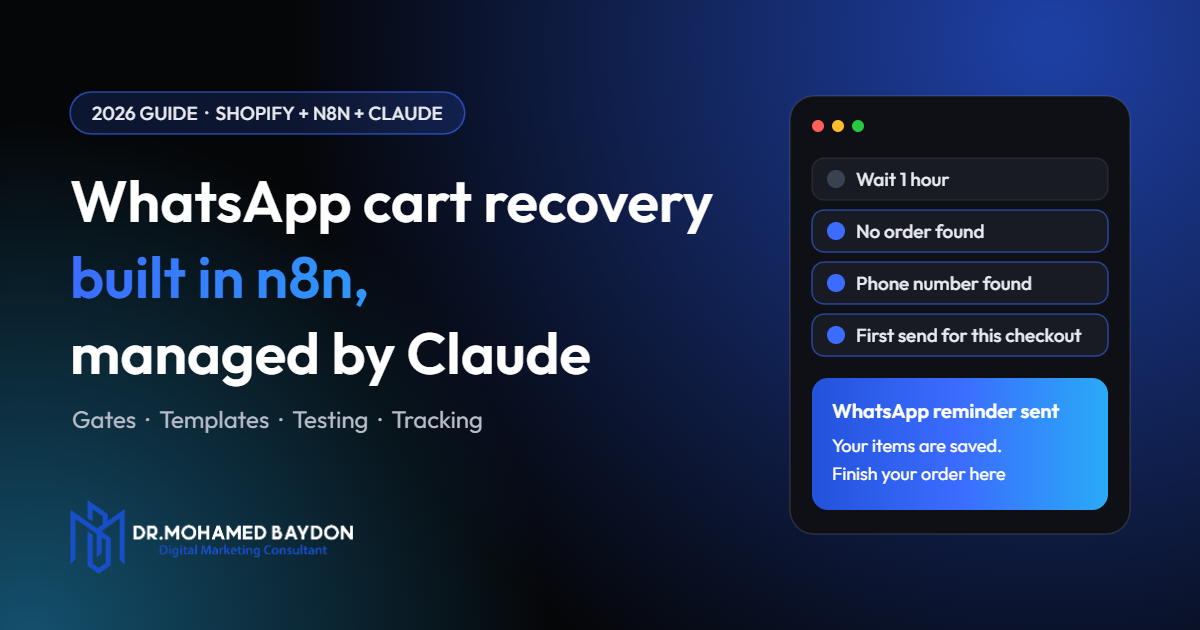
This automation waits for a Shopify checkout to go quiet, confirms that no order exists, and sends the customer an approved WhatsApp template with their recovery link. If they still have not bought 12 hours later, it sends one final reminder and stops.
Shopify defines an abandoned checkout as one where the customer added contact information but did not complete the purchase. That matters because you only ever have a phone number from that point on.
Here is the logic of the workflow as it runs on Muhra Store, in 14 n8n nodes:
- 1Shopify triggerevery checkouts/update event
- 2Wait 1 hourtime to finish alone
- 3Order gateorder found? stop
- 4Phone gateno phone? stop
- 5Once-only gatealready handled? stop
- 6First templatename and recovery link
- 7Wait 12 hoursgive them time
- 8Recheckorder and phone gates again
- 9Final templatelast message
- 10Confirmationemail if WhatsApp returned an ID
n8n, an app or Shopify Flow?
Choose n8n if you want ownership of the logic and data, and you or someone on your team can maintain a workflow. Choose an app if you want to be live today and accept a monthly fee and less control.
| Route | Best for | Main limit |
|---|---|---|
| WhatsApp app from the Shopify App Store | Fast setup with no technical work | Recurring fee, and the logic is whatever the app allows |
| n8n with WhatsApp Cloud API | Custom gates, your own data, reuse for other automations | You own maintenance, testing and compliance |
| Shopify Flow calling a webhook | Stores on Grow, Advanced or Plus that already use Flow | The Send HTTP request action is limited to those plans |
| n8n with a third-party WhatsApp gateway | Testing a quick flat-rate setup | Check how the provider connects to WhatsApp and what happens to your number if it breaks Meta’s rules |
Muhra Store runs on Shopify’s Basic plan, which is why I use n8n’s Shopify trigger rather than Flow’s HTTP action.
What you need first
You need five things: a Shopify store with API access, an n8n instance, a WhatsApp Business Platform number, approved templates, and a Claude account that can add a custom connector.
| Piece | Why it is needed | Watch out for |
|---|---|---|
| Shopify app access | Receives checkout events and reads orders | Checkout data counts as protected customer data |
| n8n | Runs the waits, gates and sends | Wait nodes need an instance that stays online. Building through MCP needs n8n 2.13.0 or later |
| WhatsApp Cloud API | Sends the messages | The number must be registered on the platform |
| Message templates | Required to start a conversation | Approval and category come from Meta, not from you |
| Claude | Audits, edits and reports | Connect it to only what it needs |
Step 1: Connect Shopify
How you connect depends on when your app was created. Since 1 January 2026, you can no longer create new legacy custom apps, and many older tutorials still describe that route.
If you already have a legacy custom app
Existing apps keep working. Paste the Admin API access token into n8n’s Shopify Access Token credential, then add the Shopify Trigger node. This is the setup I run.
If you are starting now
- Create the app in the Dev Dashboard.
- Create a version with the scopes you need. Reading checkouts and orders depends on the orders scope,
read_orders. - Request protected customer data access. Shopify says that access requires approval.
- Install the app on your store.
- Choose how n8n authenticates. The client credentials grant gives tokens that expire after 24 hours, so a static token field will not hold. Use n8n’s Shopify OAuth2 credential, or request a fresh token at the start of each run.
Step 2: Prepare WhatsApp templates
Create two marketing templates before you touch the workflow, because you cannot send free text to someone who has not messaged you in the last 24 hours. Non-template messages are only allowed inside an open customer service window.
Do not try to submit a cart reminder as a utility template. Meta’s own category guide lists a cart reminder as a marketing example, and it recategorises misclassified templates. Repeat misuse can lead to rate limits. I have seen guides advising the utility category for this exact use, and that advice conflicts with Meta’s documentation.
Keep each template short, with two variables. Here is a starting point to adapt. It is an example, not my live copy:
First reminder
Hi {{1}}, you left your order at [Store name] before finishing.
Your items are saved here: {{2}}
Need help with size or delivery? Just reply to this message.
Reply STOP to opt out.

Final reminder
Hi {{1}}, this is our last reminder about your order at [Store name].
You can finish it here: {{2}}
Reply STOP to opt out.
The line inviting a reply does real work. When a customer replies, a 24-hour service window opens, and you can then answer normally instead of using templates.
In n8n’s Send Template operation, the template field holds the name and language together. Mine look like muhra_cart_reminder|ar_EG. Match the language code exactly as it appears in WhatsApp Manager.
Step 3: Build the workflow
Build the nodes in the order below, and keep every gate before the send. The order is what stops the wrong people getting a message.
3.1 Trigger on checkout updates
Add a Shopify Trigger with the topic checkouts/update. Use update rather than create, because the phone number often arrives after the checkout begins.
Expect noise. In my log, four events landed within four seconds on 3 November, and later five landed within about three minutes. That pattern is what repeat updates look like, and it is why the gates exist.
3.2 Wait one hour
Add a Wait node set to 60 minutes. I use a test shortcut here, so messages to my own email wait one minute while real customers wait an hour:
{{ $json.email === 'you@yourdomain.com' ? 1 : 60 }}One hour is my choice for this store, not a universal rule. Test your own timing against your buying cycle.
3.3 Confirm no order exists
Add an HTTP Request node that calls the GraphQL Admin API and searches orders by checkout token:
POST https://YOUR-STORE.myshopify.com/admin/api/2026-10/graphql.json

{{ {
  "query": "{ orders(first: 1, query: \"checkout_token:" + $('Shopify Trigger').item.json.token + "\") { edges { node { id name } } } }"
} }}
This live check is the most important node in the build. A checkout’s data was frozen when the event fired, so only a fresh query tells you whether the customer has since paid.
Always pin an API version and update it each quarter. Shopify supports each stable version for at least 12 months, and 2026-10 is the latest stable version as I write this.
3.4 Confirm a phone number
Add an IF node with two conditions joined by AND. First, the order count must equal zero:
{{ $json.data.orders.edges.length }} equals 0Second, a phone number must exist. Shopify can store it in several places, so check all of them:
{{ $('Shopify Trigger').item.json.phone
|| $('Shopify Trigger').item.json.billing_address?.phone
|| $('Shopify Trigger').item.json.shipping_address?.phone
|| $('Shopify Trigger').item.json.customer?.phone
|| $('Shopify Trigger').item.json.customer?.default_address?.phone
|| '' }}
3.5 Add a consent gate
Before you copy any flow from the internet, including mine, add a check that this person agreed to hear from you. Meta states that businesses must obtain opt-in before messaging people on WhatsApp.
Shopify’s checkout payload carries buyer_accepts_sms_marketing and sms_marketing_phone. Whichever field you use, make sure your checkout wording names WhatsApp and your business, because the opt-in has to be clear about what the customer is agreeing to.
3.6 Send only once per checkout
Add a Remove Duplicates node set to “Remove Items Seen in Previous Executions”, using the checkout token as the value. I keep a history of 10,000 tokens.
Place it after the gates, not before them. If it sits first, an early event with no phone number would burn the token, and the later event with the phone number would be thrown away.
3.7 Normalise the phone number
WhatsApp needs the full international number with digits only, while customers type numbers in every format. This expression handles Egyptian mobiles:
{{ String(phone).replace(/\D/g, '').replace(/^00/, '').replace(/^0(1\d{9})$/, '20$1') }}It strips everything except digits, removes a leading 00, and converts a local number such as 010 into 20 10. Replace the last rule for each market you sell in:
| Market | Local format | Replace rule |
|---|---|---|
| Egypt | 01X XXXX XXXX | .replace(/^0(1\d{9})$/, '20$1') |
| Saudi Arabia | 05X XXX XXXX | .replace(/^0(5\d{8})$/, '966$1') |
| United Kingdom | 07XXX XXXXXX | .replace(/^0(7\d{9})$/, '44$1') |
3.8 Send the first template
Add the WhatsApp Business Cloud node with the Send Template operation. Map variable 1 to the first name, with a fallback, and variable 2 to the recovery link:
{{ $('Shopify Trigger').item.json.billing_address?.first_name
|| $('Shopify Trigger').item.json.customer?.first_name
|| 'there' }}

{{ $('Shopify Trigger').item.json.abandoned_checkout_url }}
The fallback matters. n8n’s docs note that template sends fail with a bad request when the data does not match the template, and an empty variable is a common cause.
3.9 Wait, recheck, send the final reminder
After the first send, add a 12-hour Wait, then repeat the order check and the phone check, then send the final template. Skipping the second recheck is how a customer who bought at hour three gets asked to buy again at hour thirteen.
I stop at two messages. A third reminder costs more than a message fee, because it also risks blocks and reports.
3.10 Send yourself a confirmation
Add a Code node that continues only if WhatsApp returned a message ID, then email the team the cart details. Mine includes customer, cart value, items, template used and message ID.
const wa = $input.first().json || {};
const msgId = wa.messages && wa.messages[0] && wa.messages[0].id;
if (!msgId) return [];
This gives you an instant record that a send was accepted, and your team can follow up by hand on high-value carts.
Step 4: Connect Claude to n8n
You connect Claude through n8n’s built-in MCP server, which lets Claude read workflows and run logs and, when you allow it, change them. Setup takes a few minutes.
- In n8n, go to Settings, Instance-level MCP and enable MCP access.
- Open Connect and copy the server URL. It ends in
/mcp-server/http. Choose OAuth where you can. - In Claude, go to Customize, Connectors, click Add, then Add custom connector, and paste the URL.
- Back in n8n, open your workflow settings and turn on Available in MCP. Claude cannot reach a workflow until you do this.
- Add the Shopify connector too, so Claude can compare runs against real orders. I cover that setup in Claude for Shopify.
Step 5: Manage the automation with Claude
Once connected, Claude works like an operator who can read your whole setup in seconds. You describe what you want, it inspects the real workflow and run log, and you approve any change.
Five prompts I would start with
Read my abandoned checkout workflow. List anything that could message a paying customer, message someone twice, or fail silently. Change nothing yet.
Check the last 24 hours of runs. How many stopped at each gate, how many reached a send, and did any fail?
This run failed. Find the node, explain the cause in plain English, and propose the smallest fix.
Change the first wait from 60 to 45 minutes. Show me the difference and validate it before publishing.
Compare the checkouts we messaged last week with Shopify orders by checkout token. Give me sends, recovered orders and recovered revenue.
What Claude found in my own workflow
For this article I pointed Claude at the live Muhra workflow, and the audit gave me real work to do:
- Old API version. My order checks still call Shopify’s 2024-04 version. That version is retired, so Shopify serves the oldest supported version instead. It works today, but I should not rely on it.
- Copied logic. The same long phone expression sits in several nodes, so a change for a new country has to be made in each one. It belongs in a single Set node.
- Silent gaps. If a send fails on a limit, nothing tells me or retries later. That needs an error path.
- No recovery tracking. Every send is confirmed, but nothing records which carts became orders.
A person could find all of this. The difference is that Claude finds it in the time it takes to ask, and it reads the real configuration instead of what I remember building.
Rules I keep for Claude
- Read first. Ask for findings before asking for changes.
- Approve every change to a live workflow, and review the difference before it is published.
- Never give it more store access than the job needs.
- Keep customer data out of anything it writes into a report you plan to share.
Should Claude write the messages?
For the first reminders, no. Those messages must be pre-approved templates, so a model can only fill small variables, and generating free text would fail outside the 24-hour window.
Some guides describe AI writing a unique recovery message for each cart. Check how that message reaches the customer. If the shopper has not messaged you, it still has to fit inside an approved template.
Claude does fit in one live place: after the customer replies. That opens the service window, and you can run a support assistant using n8n’s Anthropic Chat Model node to answer size, delivery and payment questions.
Keep that assistant focused on your store. WhatsApp’s terms now bar general-purpose AI assistants as a primary function, while businesses using AI to serve their own customers are not affected. Always give customers a route to a human.
Test it before launch
Test with a real checkout on your own phone, because Claude cannot fire this workflow for you. n8n’s MCP server only runs schedule, webhook, form and chat triggers directly, so a Shopify trigger has to come from a real event.
- Start a checkout using your test email and phone, then leave.
- Confirm the template arrives after the short test wait, and the link restores your cart.
- Repeat, but complete the order inside the wait. Confirm nothing is sent.
- Repeat without a phone number. Confirm the run stops at the phone gate.
- Edit the same checkout several times. Confirm you get one message.
- Repeat with a local-format number. Confirm it was normalised correctly.
- Ask Claude to read those runs and confirm each stopped where it should.
WhatsApp rules and costs
You pay per delivered template, you need opt-in first, and Meta can quietly limit marketing messages per person. Plan for all three.
Cost
WhatsApp charges only when a message is delivered, and the rate depends on the message category and the recipient’s country. Check Meta’s current rate card for your market, as prices can change on the first day of each quarter.
Service pricing changed on 1 October 2026. Each number now gets 1,000 free service messages a month, then those messages are charged, so older guides that say service replies are free are out of date.
Opt-out
Meta recommends clear opt-out instructions and honouring those requests. Add a second workflow with a WhatsApp Trigger that catches STOP, saves the number to an n8n data table, and add a gate that checks this list before every send.
Per-person marketing limits
Error 131049 means Meta blocked a marketing template because the person reached their limit. The limit applies per recipient, and retrying straight away returns the same error. Log it, skip that send, and do not treat it as a fault in your account.
Measure recovery honestly
Count a cart as recovered only when a Shopify order matches a checkout you messaged, within a fixed window you set in advance.
If cost and trust are your real leak, fix the page first. I break that down in the anatomy of a high-converting product page.
You will see bold recovery claims in this space. One vendor quotes 26 to 33%, and one builder reports 23%. Treat figures like these as claims to test, not forecasts for your store, since methods differ and some of those buyers would have come back anyway.
You will notice I do not quote a recovery rate for Muhra here. My workflow confirms every send, but it did not record which carts became orders, so any percentage would be a guess.
The simple setup I recommend
- Log every send. Save checkout token, stage, time and cart value to an n8n data table.
- Hold some customers back. After the Remove Duplicates node, send 80% on and hold 20% with
Math.random() < 0.8. Log the held group too. - Match orders. Once a week, ask Claude to check each logged token against Shopify orders using a seven-day window.
- Compare groups. Your real result is the messaged group’s order rate minus the held group’s order rate.
- Add a reconciliation check. Shopify says webhook delivery is not guaranteed, so compare your log with Shopify’s abandoned checkouts list to spot missed events.
This needs enough volume to mean anything. A small store should run the holdout for longer before drawing a conclusion.
Common failures and fixes
Most failures come from data format, duplicate events or old setup instructions. This table covers the ones to check first.
| Symptom | Likely cause | Fix |
|---|---|---|
| Bad request on send | Template variables do not match, or a value is empty | Check the order and count of variables, and add fallbacks |
| Customer gets two messages | Remove Duplicates is missing, or sits on the wrong token | Dedupe on the checkout token after the gates |
| Paying customer gets a reminder | No live order check, or it runs before the wait | Query orders after every wait |
| Runs stop at the phone gate | Checkout does not collect a phone, or it sits in another field | Require a phone at checkout and check all five fields |
| Send fails with 131049 | Per-person marketing limit | Log and skip. Do not retry at once |
| No events arrive at all | Workflow not published, or missing scope or data access | Check the workflow state, scopes and protected data approval |
| Template moved to marketing | Meta recategorised it | Accept it, or rewrite it. Budget for marketing rates from the start |
| Claude cannot see the workflow | MCP is not enabled for it | Turn on Available in MCP in the workflow settings |
Frequently asked questions
Can n8n send WhatsApp abandoned cart messages from Shopify?
Yes. n8n can receive Shopify checkout events, check for an order, and send an approved template through the WhatsApp Business Cloud node. You need a WhatsApp Business Platform number and approved templates.
Is a WhatsApp cart reminder a utility or marketing template?
Marketing. Meta lists a cart reminder as a marketing template example, and it can recategorise templates submitted under the wrong category.
Can Claude write each WhatsApp message on the fly?
Not for the first contact. Outside a 24-hour customer service window you can only send approved templates, so Claude can only supply template variables. Once a customer replies, free text is allowed within that window.
Do I need customer opt-in for abandoned cart messages on WhatsApp?
Yes. Meta requires opt-in before you message people on WhatsApp. It should name your business and make clear that the customer is agreeing to receive messages.
How long should I wait before the first message?
I use one hour, then a final reminder 12 hours later. There is no single correct delay, so test it against how long your customers normally take to buy.
Does this work on Shopify Basic?
Yes. Muhra Store runs this on the Basic plan using n8n’s Shopify trigger. The plan limit applies to Shopify Flow’s Send HTTP request action, which needs Grow, Advanced or Plus.
How much does it cost to run?
You pay Meta for each delivered template at the marketing rate for that country, plus your n8n hosting or plan. Check Meta’s current rate card for your market before you estimate your return.
Platform rules, prices and API versions change often. Check Meta’s, Shopify’s and n8n’s current documentation before launching. Sources: Meta pricing, Meta template categories, Meta opt-in, Shopify API versioning, n8n MCP server, Claude custom connectors, Baymard Institute.
Built on your own accounts
Stop losing checkouts you already paid to win
I run this system live on Muhra Store. If you want it built properly for yours, with the gates, tracking and handover covered, tell me about your store and I will reply with what fits.